Guide treatment: Reference. Essential guidance is in the page content below.
On-chain transparency
See Where Your Bitcoin Transaction Is & What’s Happening Under the Hood
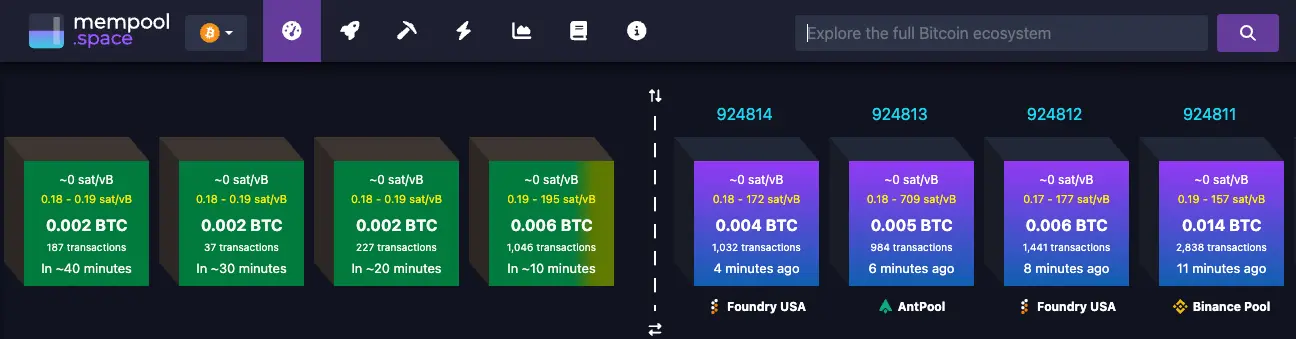
When you move meaningful Bitcoin, you want certainty. Tools like mempool.space let you watch your transaction move from “unconfirmed” to safely settled on the blockchain in real time.
Track confirmations in real time Understand fees and wait times Verify, don’t guess
Transaction Signing Protocols & Withdrawal Guidance
Understanding how transaction signing works helps you plan withdrawals and ensures timely processing. This is an important process for all clients to understand.
How Transaction Signing Works
- Invoice payments and spends of 1% or less of your vault balance: After you approve with your key, TBA can counter-sign once its security checks are done. No DocuSign, cooling-off period, or Confirmation Call is required. (Balance for the 1% check is the vault display balance in sats; invoice amounts must match uniquely within a small sats tolerance.)
- Spends greater than 1% of your vault balance: After you approve with your key, you complete a DocuSign Signing Request authorisation for that exact transaction, then a cooling-off period applies (default two days from when the request is created in Theya; your vault may use a longer setting), then your adviser holds a Confirmation Call before TBA counter-signs. DocuSign does not replace the Confirmation Call.
Paying invoices: For Theya clients, see Theya's invoice payment guide for step-by-step instructions on paying advisor invoices via Theya Vault or external wallet. Unchained clients receive invoices manually and should follow their adviser's guidance for payment.
Planning a larger or urgent withdrawal?
If you’re planning a spend greater than 1% of your vault, or if a withdrawal is urgently required, please reach out to your adviser via email and cc sign@thebitcoinadviser.com to notify us. Complete DocuSign authorisation promptly so cooling-off, the Confirmation Call, and TBA co-sign can proceed on schedule.
Processing timeframes: For invoice payments and spends of 1% or less, we endeavor to sign within 48 hours and sooner if possible. For spends greater than 1%, plan for the cooling-off period (default two days from when the request is created) plus the Confirmation Call before TBA can co-sign. Please note that this is long-term cold storage, and rush transactions are often a red flag that something is wrong. We wish to make sure funds are always safe first.
What Is the Bitcoin “Mempool”?
When you send Bitcoin, your transaction doesn’t land on the blockchain instantly. First, it enters a kind of waiting room called the mempool (short for “memory pool”).
Every Bitcoin node keeps its own version of this waiting room. Transactions in the mempool are:
- Valid: they pass Bitcoin’s rules,
- Broadcast: they’ve been sent to the network, but
- Not yet confirmed: they aren’t in a block yet.
Miners choose which transactions to include in the next block, generally selecting higher-fee transactions first. A website like mempool.space lets you see this waiting room and find your own transaction inside it.
How to Look Up Your Transaction on mempool.space
Here’s a simple way to see where your Bitcoin transaction currently sits:
Look Up Your Transaction Now
Paste your transaction ID (TXID) below to view it on mempool.space:
- Get your transaction ID (TXID). In your sending wallet or exchange, open the transaction details and look for “TXID”, “Transaction ID”, or “Hash”. Copy that long string of letters and numbers.
- Open mempool.space. In your browser, go to mempool.space.
- Paste your TXID into the search bar. At the top of the page, paste your TXID and press Enter. You’ll be taken to a dedicated page showing your transaction.
- Check the status and confirmations. You’ll see whether the transaction is unconfirmed (still waiting), has 1 to 5 confirmations (becoming more secure), or 6+ confirmations (generally considered final).
- Review the fee you paid. mempool.space shows the fee rate (in sats/vByte) and how it compares to current network conditions.
What Happens When You Send Bitcoin?
Behind the scenes, a Bitcoin transaction follows this flow:
- Your wallet creates and signs the transaction.
- It broadcasts to the Bitcoin network.
- It enters the mempool and is verified by nodes.
- Miners select it and include it in a block.
- That block is added to the blockchain (1 confirmation).
- Each new block on top adds more confirmations.
You don’t need to be a technician to use Bitcoin safely, but having a clear window into this process reduces anxiety and builds trust in your setup.
Client experience, not guesswork. When we move funds for you as part of a collaborative security setup, we often include a direct mempool.space link to your transaction so you can see exactly what we’re seeing.
Fees, Network Congestion, and “Stuck” Transactions
Each Bitcoin block has limited space. When many people are sending transactions at once, there is competition for that space. Miners tend to prioritise transactions paying higher fees.
On mempool.space you can quickly see:
- The current fee range for economy, normal, and priority confirmations.
- How many unconfirmed transactions are sitting in the mempool.
- Where your transaction’s fee sits relative to others.
If your transaction appears to be taking longer than expected, it usually means you paid a lower fee during a busy period. The transaction is almost always still valid and simply waiting its turn.
Slow does not mean lost.
A delayed confirmation doesn’t mean your Bitcoin has disappeared. It typically means the network is congested or the fee was conservative. If you’re a client of The Bitcoin Adviser and you’re unsure, we can review the transaction with you and explain what’s happening in plain language.
How This Fits Into Your Collaborative Security Setup
At The Bitcoin Adviser, we use tools like mempool.space as part of our internal monitoring and client support processes. For example, we use them to:
- Verify that funds have left an exchange and are on their way to your collaborative security vault.
- Confirm that incoming deposits to your 2-of-3 multisig wallet are mined and fully settled.
- Track and document transactions during inheritance and estate processes.
This is part of a broader philosophy: no single point of failure, clear visibility of your holdings, and education that helps you and your family feel confident with meaningful amounts of Bitcoin.
Need help reading a transaction?
If you’re working with us and want a second set of eyes on what you’re seeing in your wallet or on mempool.space, we’re happy to walk through it with you as part of your onboarding or review sessions. Contact us at contact@thebitcoinadviser.com.
Common Questions
- Is it safe to paste my transaction ID into mempool.space?
- Yes. A transaction ID (TXID) does not give anyone control over your Bitcoin. It simply shows information that is already public on the blockchain, such as amounts, addresses, and confirmation status.
- How many confirmations should I wait for?
- For small everyday amounts, 1 to 3 confirmations are often sufficient. For larger or life-changing amounts, we generally prefer to wait for 6 confirmations or more before considering a transaction final.
- My transaction has been unconfirmed for hours. Is something wrong?
- Not necessarily. In most cases, it means the network is busy or the fee was set below the current priority range. If you’re concerned, we can help you understand the options available in your specific situation.
- Do I need to check mempool.space every time I send Bitcoin?
- No. Most wallets and exchanges already show confirmation counts. mempool.space is an extra tool for when you want deeper visibility, extra peace of mind, or a clear explanation of what’s happening under the hood.